LibreOffice and Apache OpenOffice share ancestry, but they are not interchangeable in 2026. LibreOffice is the actively maintained default for new deployments. OpenOffice remains relevant mainly for legacy environments that standardized on it years ago. Start from the Microsoft Office alternatives catalog when you are also evaluating desktop suite replacements.
The common failure mode is treating this as a taste question. Organizations keep OpenOffice because it still opens files, not realizing that release cadence, security fix latency, and format compatibility have diverged for over a decade. The gap does not announce itself—until a malformed DOCX, an unpatched vulnerability, or a broken macro forces the issue at the worst possible time.
Choose LibreOffice unless you have a documented OpenOffice constraint you can name: a specific macro suite, a certified workflow, or a locked-down environment where change control costs more than the risk. Treat continued OpenOffice use as technical debt with a scheduled migration plan, not a permanent decision. For broader evaluation method, see how to evaluate an open-source project.
Key takeaways
- LibreOffice is the maintained FOSS office suite for 2026; OpenOffice releases are sparse.
- LibreOffice tracks Microsoft Office formats more aggressively—still pilot complex DOCX/XLSX.
- Extensions, templates, and UI options are broader and better maintained in LibreOffice.
- Security fix latency is the strongest argument against new OpenOffice deployments.
- Migrate macros and templates with a pilot group before org-wide rollout.
- Browser collaboration suites solve a different problem than desktop FOSS—evaluate separately.
Shared history, divergent paths
Both suites descend from OpenOffice.org. After Oracle’s stewardship ended, the community largely consolidated around LibreOffice (The Document Foundation), while Apache OpenOffice continued under the Apache Software Foundation with a slower release cadence.
How we evaluated
This comparison uses the projects' official release history, security notices, documentation, and public repository signals. We weighted maintenance and security response first, then Microsoft Office format compatibility, extension availability, managed deployment, and migration risk. The broader catalog context comes from our 2026 open-source ecosystem report, whose sample and limitations are published with the results.
We did not run a universal DOCX/XLSX round-trip benchmark: no small test corpus can represent every organization's templates, macros, fonts, and embedded objects. Treat the compatibility conclusions as shortlist guidance, then test your own highest-risk files before migration.
Quick comparison
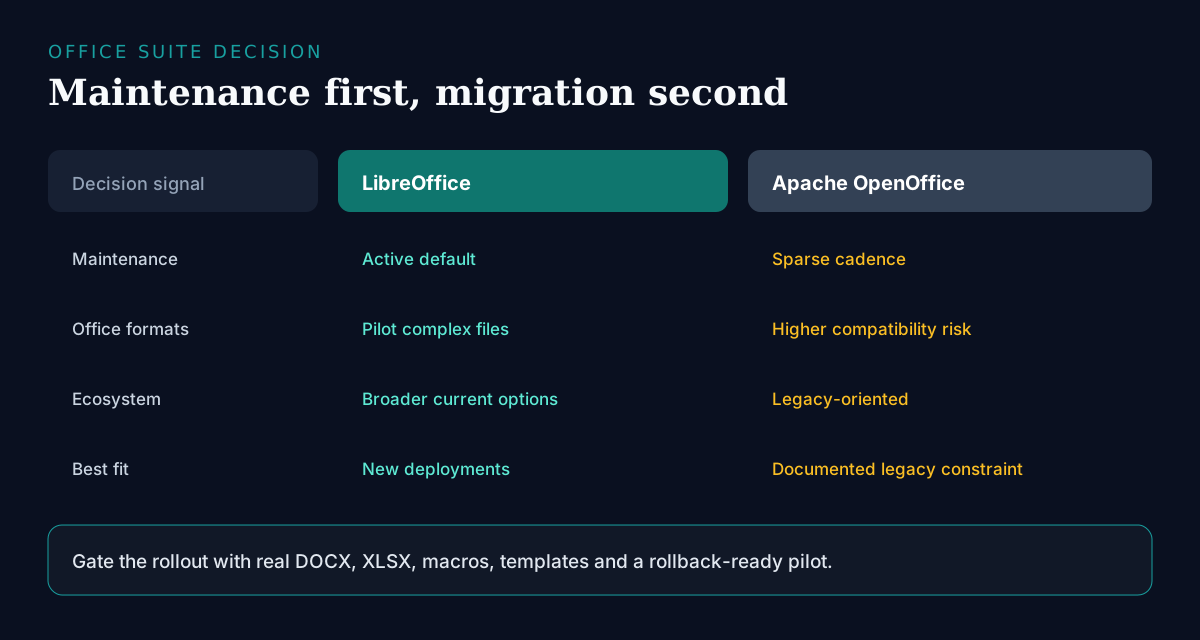
| Dimension | LibreOffice | Apache OpenOffice |
|---|---|---|
| Release velocity | Frequent updates and security fixes | Sparse releases |
| MS Office compatibility | More aggressive DOCX/XLSX tracking | Adequate; less current |
| Extensions & templates | Broader, better maintained | Smaller ecosystem |
| UI options | Multiple modes, including tabbed | Classic layout focus |
| Security posture | Regular advisories and timely patches | Slower fix cadence; higher exposure window |
| Macro compatibility | Runs most StarBasic macros; better VBA import | Original StarBasic home; frozen in time |
| Best default in 2026 | Yes—for new deployments | Legacy lock-in only |
How to decide for your environment
- Count your macro and template inventory first—that inventory, not features, sets migration cost.
- Check whether any regulated or certified workflow explicitly names OpenOffice; if not, the constraint is habit.
- Estimate exposure: how long can you accept running a suite with slow security releases on internet-connected machines?
- Confirm your deployment tooling (MSI/managed packages) supports LibreOffice—the answer is almost always yes.
- If collaboration is the real pain, evaluate browser suites in parallel rather than forcing a desktop-only answer.
Feature and compatibility notes
- Release velocity: LibreOffice ships frequent updates; OpenOffice releases are comparatively sparse.
- File compatibility: LibreOffice generally tracks Microsoft Office formats more aggressively, though complex DOCX/XLSX still need testing.
- Extensions and templates: LibreOffice’s ecosystem is broader and better maintained.
- UI modernization: LibreOffice offers multiple UI modes (including tabbed options) closer to contemporary suites.
- Platform support: both cover major desktops; verify Linux packaging and macOS builds for your OS version.
LibreOffice
 LibreOffice
Open in catalogA full office suite (Writer, Calc, Impress, Draw, Base) with active volunteer and ecosystem development, strong ODF support, and practical MS Office import/export. Its strengths are cadence and ecosystem: frequent releases, timely security fixes, and the broadest extension and template library in desktop FOSS. The limits are real but manageable—complex VBA macros and heavy Excel workbooks still need piloting, and real-time collaboration requires a separate browser suite. Choose it as the default for any new open-source desktop deployment; for organizations, prioritize managed packages and template governance over one-off installs.
- Best for
- Individuals, schools, governments, and companies standardizing on an open desktop suite.
- Deployment
- Desktop installs; some orgs deploy via managed packages.
- Pricing
- Free and open-source; optional commercial support from third parties.
- Unique
- Active maintenance and the strongest default FOSS office choice in 2026.
Apache OpenOffice
Apache OpenOffice
The historic Apache-branded suite. Its remaining strength is stability for environments frozen around it: the UI, file behavior, and StarBasic macros have barely changed in years, which is exactly what some locked-down deployments want. The limits dominate for everyone else—sparse releases, slower security fixes, weaker modern DOCX/XLSX handling, and a shrinking extension ecosystem. Choose it only when a documented constraint ties you to it, and pair that choice with a scheduled migration plan rather than an indefinite exception.
- Best for
- Legacy environments already locked to OpenOffice workflows and macros.
- Deployment
- Desktop.
- Pricing
- Free and open-source.
- Unique
- Familiarity for long-running OpenOffice deployments—not feature leadership.
Practical migration playbook
- New deployments: choose LibreOffice unless you have a documented OpenOffice constraint you can name in one sentence.
- Inventory macros, templates, and mail-merge documents before setting a timeline—this list, not license cost, drives the schedule.
- Run a two-week pilot with the users who own the most complex spreadsheets and templates, not the most enthusiastic volunteers.
- Migrate macros and complex templates in the pilot group first; StarBasic mostly carries over, VBA needs case-by-case testing.
- Standardize fonts across the fleet before conversion—font substitution causes more visible breakage than format conversion itself.
- Roll out via managed packages with a pinned version and a defined update cadence, not ad-hoc downloads.
- For heavy collaborative editing, evaluate browser suites separately—desktop FOSS and cloud collab solve different problems.
- Keep a conversion checklist for fonts, mail merge, and spreadsheet macros, and log every failure the pilot finds.
Frequently asked questions
- Is LibreOffice better than OpenOffice in 2026?
- For almost all new users and organizations, yes. LibreOffice has faster releases, timelier security fixes, stronger Microsoft format work, and a larger extension ecosystem—advantages that have compounded for over a decade since the projects split. OpenOffice is mainly a legacy choice for environments that standardized on it and cannot yet absorb the change cost. If you are choosing fresh today, there is no technical argument for OpenOffice.
- Can I open Microsoft Office files in LibreOffice?
- Yes for most DOCX/XLSX/PPTX files, and round-trip fidelity has improved steadily. The remaining friction points are predictable: complex VBA macros, elaborate mail merge, pivot-heavy workbooks, and documents that depend on fonts you have not deployed. Pilot on your real templates—not sample files—before you standardize, and fix fonts fleet-wide first, since substitution causes most of the visible layout breakage.
- Should I migrate from OpenOffice to LibreOffice?
- Yes if you can schedule it, and the migration is gentler than most suite changes: LibreOffice reads OpenOffice files natively and runs most StarBasic macros unchanged. Inventory macros and templates, test with a pilot group that owns the most complex documents, then roll out managed packages with a pinned version. Leaving OpenOffice indefinitely increases update and security risk every quarter—the cost of waiting rises while the cost of moving stays flat.
- Is LibreOffice a full Microsoft Office replacement?
- It replaces Writer/Calc/Impress-style desktop work for many organizations, including document-heavy government and education deployments. The honest gaps: real-time cloud collaboration needs a separate browser suite, deep Excel/VBA automation needs case-by-case compatibility testing, and users embedded in Microsoft 365 workflows will feel integration friction. Scope the replacement per workflow rather than per suite—most orgs land on LibreOffice for desktop work plus a separate answer for collaboration.
- Where do I find other Microsoft Office alternatives?
- Start with the catalog’s Microsoft Office alternatives page, then compare desktop FOSS suites against hosted collaboration tools based on your workflow.
Conclusion
Treat LibreOffice as the maintained open-source office suite for 2026: it wins on release cadence, security posture, format compatibility, and ecosystem, and the gap widens every year. Keep OpenOffice only where a documented constraint makes migration cost exceed the risk of slower updates—and even then, put a transition date on the calendar. The decision is not which suite is better; that question was settled years ago. The decision is how quickly your environment can absorb the change, and a two-week pilot with your most complex documents answers it.
Build a stack for this use case.
Answer nine practical questions and compare three transparent architectures with costs, free limits, lock-in, and migration paths.
Build my stack