Claude Code became a viral search because developers want an agent that edits repositories, runs tests, and uses tools—not only chat in a sidebar. The shift matters: an assistant that can read your monorepo, execute a test suite, and open a pull request is a different product class from autocomplete, and it raises different questions about permissions, cost, and trust.
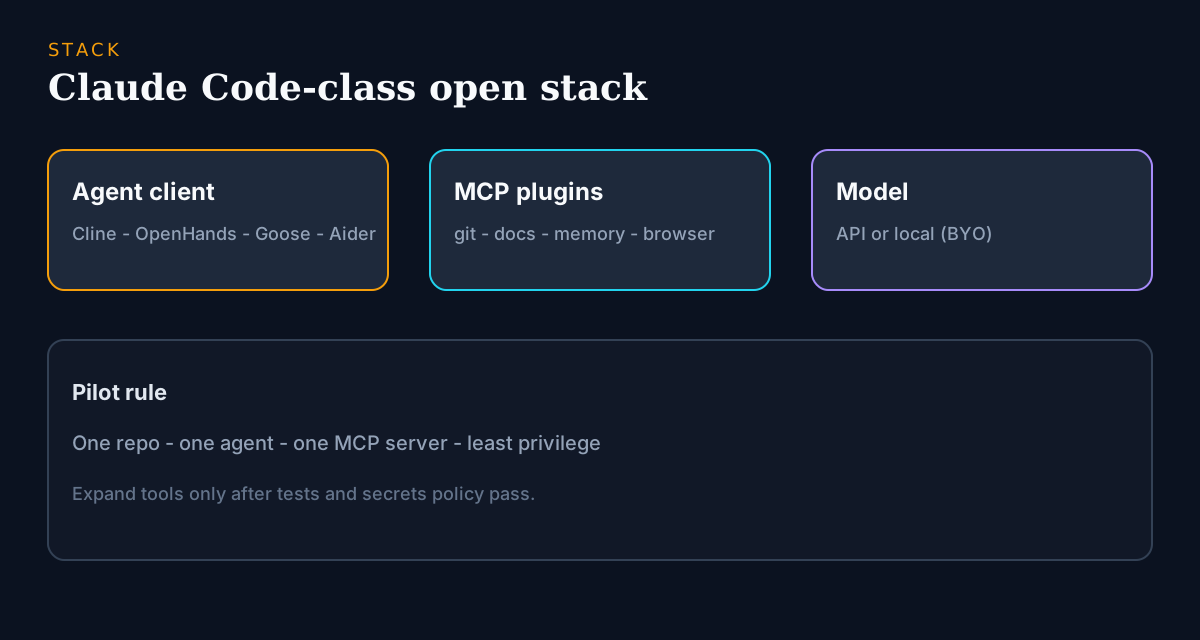
The open-source angle is the same pattern as Grok plugins: treat “plugins” as MCP servers (and agent tool adapters), then pick a client you can audit. You do not need a perfect Anthropic twin. You need (1) a coding agent/client, (2) a model/API you accept, and (3) a small set of tools with least privilege—filesystem, git, tests, docs search.
This guide separates the three things people conflate under “Claude Code plugins,” compares the open agents that actually cover those workflows, and gives you a migration checklist that starts with one repository instead of a platform rollout. The honest version includes where Claude Code still wins—because migrations built on hype fail at the first rough edge.
Key takeaways
- Separate Claude chat, Claude Code (agent), and MCP plugins—three different jobs.
- Cline, OpenHands, Continue, Goose, and Aider cover most Claude Code workflows.
- Prefer MCP (or explicit tool allowlists) over opaque plugin stores.
- Pilot one real monorepo: multi-file edits, tests, and secrets policy beat demos.
- OpenAI Codex CLI is open source and often sits in the same shortlist as Claude Code alternatives.
- Keep Anthropic models optional: BYO-key clients let you compare providers without rebuilding the stack.
What people mean by “Claude Code plugins”
- Tool use: run shell/tests, read/write files, open PRs.
- Repo memory: index large codebases without pasting everything into chat.
- External systems: tickets, docs, browsers, databases—via connectors.
- Team policy: which tools are allowed in CI versus on a laptop.
In open source, those capabilities map cleanly to MCP servers and agent runtimes. That is why Awesome MCP Servers, Goose, Continue, and codebase-memory-style tools keep climbing discovery charts alongside Claude Code searches. The practical consequence: you shop for two things separately—an agent client whose permission UX you trust, and a short list of tool servers whose code you have actually skimmed.
Quick comparison
| Project | Closest Claude Code job | Deployment | Plugin/tool angle |
|---|---|---|---|
| Cline | IDE agent loops | Editor extension | Tool allowlists + BYO models; approval gates before each action |
| OpenHands | Autonomous coding agent | Self-host / local | Strong multi-step agent; heavier setup, aimed at delegated tasks |
| Continue | IDE chat + edits | VS Code / JetBrains | BYO models + tooling; the lowest-friction daily-driver migration |
| Goose | Local agent runtime | Local | MCP-native design; best when auditable local tools are the point |
| Aider | Terminal repo edits | CLI | Git-first workflows; diffs and commits as first-class output |
| OpenAI Codex CLI | Terminal coding agent | CLI (OSS) | Often compared head-to-head; official OSS baseline from OpenAI |
| codebase-memory-mcp | Repo memory plugin | MCP server | Context without vendor lock; pairs with any MCP client above |
Cline
 Cline
Cline
Open in catalogEditor-centric agent that feels closest to “Claude Code in the IDE” for many teams: plan, edit, run tools, iterate. Strengths: transparent step-by-step execution with approval checkpoints, strong MCP integration, and provider-agnostic model support so you can keep Anthropic models or switch. Limits: agent sessions can burn tokens fast on large tasks, and it is not an autocomplete engine—pair it with a completion tool if you miss tab-complete. Choose it when Claude Code for you means interactive agent loops in the editor with visibility into every action.
- Best for
- Developers who live in VS Code-class editors and want agent loops with visibility.
- Deployment
- Editor extension.
- Pricing
- Open-source client; model/API costs separate.
- Unique
- Best first trial when Claude Code means interactive coding in the IDE.
OpenHands
OpenHands
Open in catalogOpen autonomous coding agent oriented around longer tasks. Strengths: genuine multi-step autonomy—plan, execute, self-correct—with a self-hostable runtime you can inspect and sandbox. Limits: setup is heavier than an editor extension, results vary more with task framing than IDE agents do, and unattended runs demand real guardrails. Choose it when you want supervised autonomy—“take this ticket and attempt it”—rather than pairing, and when self-hosting the agent runtime is a requirement, not a preference.
- Best for
- Teams prototyping agentic engineering workflows they can self-host or inspect.
- Deployment
- Self-hosted / local.
- Pricing
- Open-source; infra and model costs separate.
- Unique
- Closest FOSS cousin to “agent engineer” narratives (Claude Code / Devin class).
Continue + Goose + Aider
Continue
Open in catalogBYO-model IDE assistant. Strengths: mature VS Code/JetBrains support, per-feature model routing, and team-shareable configuration that reviews like normal code. Limits: its agentic depth trails dedicated agents like Cline—it is chat-and-edit first, autonomy second. Choose it when plugins/tools should live next to the code, you already standardize on mainstream editors, and you want Copilot/Cursor/Claude Code overlap without a proprietary editor fork.
- Best for
- Orgs that want Copilot/Cursor/Claude Code overlap without a proprietary editor fork.
- Deployment
- Editor extension.
- Pricing
- Open-source.
- Unique
- Lowest-friction IDE on-ramp into tool-using assistants.
Goose
Open in catalogLocal agent runtime with a strong MCP-era story. Strengths: MCP-native tool discovery, local-first execution, and an agent loop you can audit end to end. Limits: developer-tool polish—expect configuration—and output quality tracks whichever model you attach. Choose it when Claude Code plugins really mean “give the agent tools I control,” and portability of those tools across clients matters more than a single vendor's UX.
- Best for
- Developers running local agents with auditable tool servers.
- Deployment
- Local.
- Pricing
- Open-source.
- Unique
- Best bridge from Claude Code hype to open MCP stacks.
Aider
Open in catalogTerminal-first repo editing with git-native habits. Strengths: every change lands as a reviewable diff/commit, it is fast to install and prove value on a real repo, and it works with a wide range of models. Limits: no GUI, no autocomplete, and long multi-step autonomy is not its design center. Choose it when Claude Code for you means CLI + commits, your reviewers trust patches over chat transcripts, and you want measurable value in the first hour.
- Best for
- Engineers who prefer shell workflows and explicit diffs.
- Deployment
- CLI.
- Pricing
- Open-source; models separate.
- Unique
- Fastest path to measurable coding-agent value on a real repo.
Selection criteria
Score candidates against the constraints that decide long-term fit—demo impressions fade, permission reviews do not:
- Does the client show and gate every tool call, or does the agent act silently?
- Can you route to Anthropic, OpenAI-compatible APIs, and local models without forking config?
- How does it handle a real multi-file refactor on your monorepo—not a toy project?
- Are tests, linters, and formatters usable inside the agent loop?
- Where do secrets live, and can the setup be committed so the team shares one config?
- License and maintenance: recent commits, responsive issues, and terms your legal team accepts.
Recommended MCP plugins for coding agents
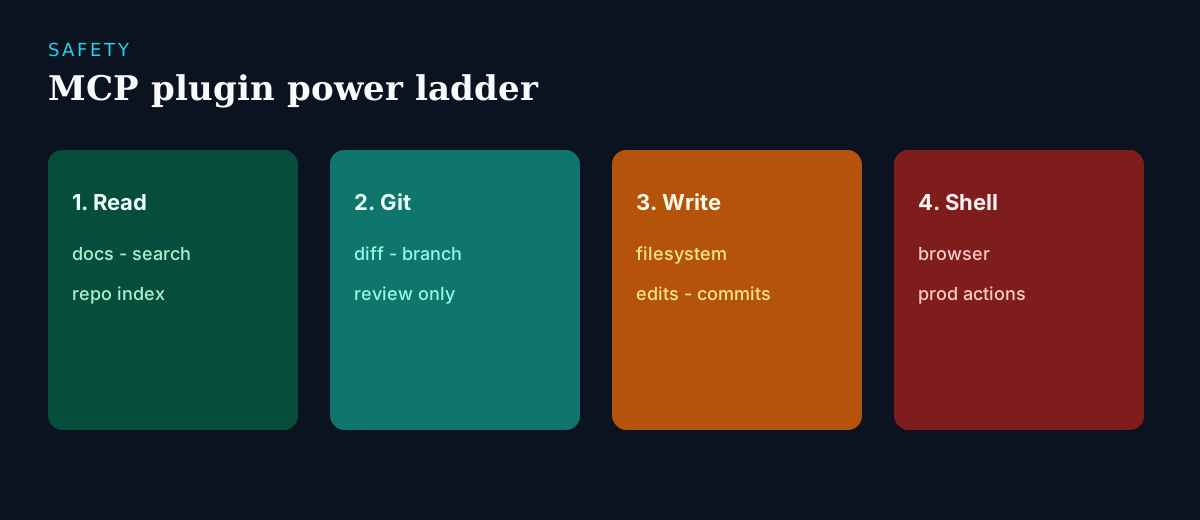
- Read-only first: docs search, repo indexing, ticket viewers.
- Git + filesystem next—only after you trust the client’s permission UX.
- Browser/scraping tools last (high blast radius)—see the browser agents guide.
- Never paste production secrets into prompts; configure env/vault per server.
- Allowlist servers; treat random MCP installs like random shell scripts.
Migration playbook (Claude Code → open stack)
Run this as a one-week pilot on a secondary but real repository—not a big-bang switch:
- Day 1: list the three workflows you use daily (refactor, tests, PR review) and pick one client—Cline or Continue for IDE, Aider/Goose/Codex CLI for terminal.
- Days 2–3: connect one model path (API or local) and route real work through it; note every fallback to Claude Code and why.
- Day 4: run one deliberate multi-file refactor and one test-fixing session; save transcripts and measure token cost on a real PR.
- Day 5: add one MCP server that removes a manual step—not ten—and decide extend, switch, or drop on evidence.
- After a successful pilot: document tool allowlists and shared config for teammates before scaling.
What still favors Claude Code
Honesty helps migrations succeed. Claude Code ships a tightly tuned agent loop where model, prompts, and tools are optimized together—BYO stacks rarely match that polish on day one. Anthropic's models remain among the strongest for agentic coding, and a single subscription hides routing decisions that open stacks make you own. If your team ships faster because nobody configures anything, the open stack must beat that convenience, not just match features. The clearest switch cases: hard data-residency requirements, heavy usage that makes seat pricing painful, or tools the vendor surface will not allow.
Frequently asked questions
- Does Claude Code support MCP / plugins?
- Tooling surfaces change by product version, so any specific answer goes stale quickly. The durable strategy is open MCP servers plus an agent client that already speaks MCP—your tools stay portable if the vendor plugin catalog lags or its policy changes.
- What are the best open-source Claude Code plugins?
- Prefer MCP servers for git, filesystem, docs, and repo memory from maintained lists (start with Awesome MCP Servers), and skim each repo's permissions before installing. Avoid opaque connectors you cannot audit—they recreate the lock-in you were leaving.
- Claude Code vs Cursor vs Codex—what should I compare?
- Claude Code and Codex are agent/CLI oriented; Cursor is an AI editor. Compare by the workflow you use most hours per day, not by brand. Many teams shortlist one IDE agent (Cline/Continue) and one terminal agent (Aider/Goose/Codex CLI), then keep whichever survives a week of real work.
- Can I keep Anthropic models with open agents?
- Often yes via API keys in BYO clients—Cline, Continue, Aider, and Goose all support multiple providers. Confirm each client's provider list and your data-retention policy; using Anthropic's API from an open client is a different privacy posture than the hosted product.
- Is this safer than installing random VS Code AI plugins?
- Only if you review permissions. Open source makes review possible; it does not make every repo safe by default. An unaudited MCP server with shell access is riskier than a sandboxed marketplace extension—the safety comes from your allowlist process, not the license.
- What does an open Claude Code replacement cost?
- The agents are free; the models are not. Heavy agent sessions can burn more in API tokens than a subscription seat, while light users spend far less. Local models shift cost to hardware. Measure token spend on one real PR during the pilot before deciding.
Conclusion
To capture Claude Code demand without becoming a single-vendor demo, build on open agents + MCP—and treat it as an evidence-driven pilot, not a leap of faith. Start from the Claude Code and MCP hubs, pick the client that matches where you actually work (Cline in the editor, Aider in the terminal, OpenHands for delegated tasks), and prove one repository workflow end to end: multi-file edits, tests, and a real PR. Add MCP servers one at a time with a written allowlist. If the open stack wins, you own your tools, your model routing, and your costs; if it does not, you learned exactly which Claude Code feature is worth paying for. Either way, share the stack—not a closed plugin screenshot.
Build a stack for this use case.
Answer nine practical questions and compare three transparent architectures with costs, free limits, lock-in, and migration paths.
Build my stack