Windsurf competes in the Cursor-class market: an AI-first coding environment with agent workflows, multi-file edits, and chat over your repo. Like Cursor, it bundles several previously separate ideas—context-aware completion, conversational editing, and agentic “flows”—into one subscription, which is exactly why no single open-source tool replaces it feature-for-feature. Open-source “Windsurf alternatives” usually mean editor extensions and agents you control, not a pixel-perfect IDE clone.
The reasons teams leave are consistent: per-seat pricing that scales badly, uncertainty about where code context is sent, wanting local models for sensitive repositories, or vendor lock-in on model routing after acquisition news cycles. Each motivation points at a different open project—privacy points to local-model extensions, cost points to BYO-key setups, and lock-in points to portable tool protocols like MCP.
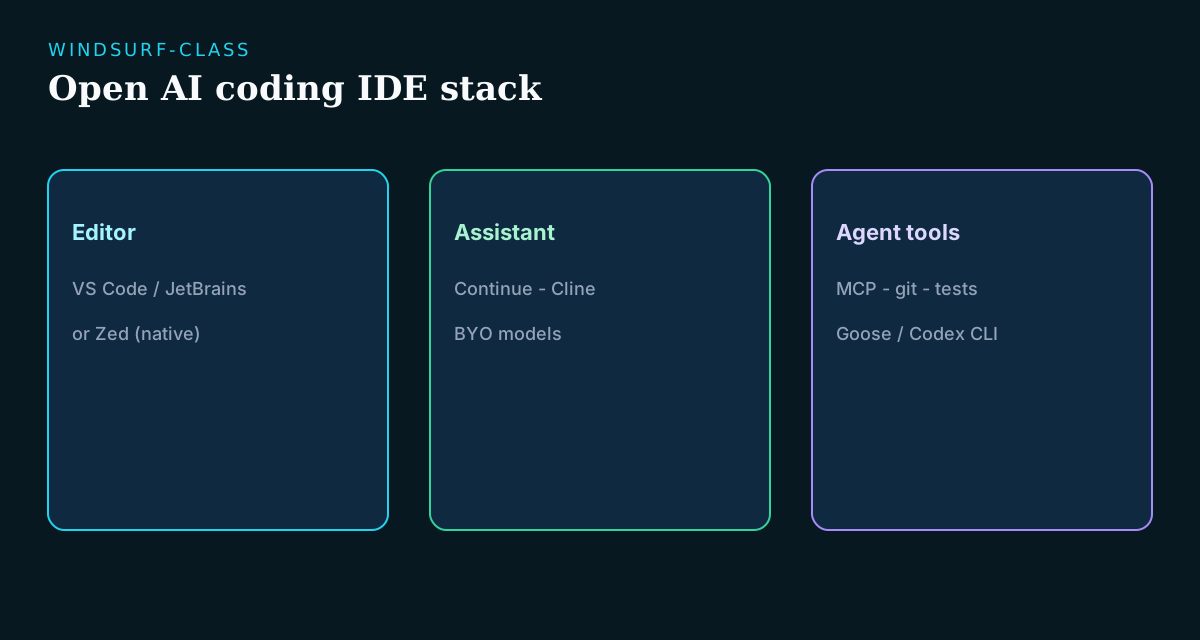
Split the decision early: do you need (1) an AI editor experience, (2) an agent that runs tools, or (3) both? FOSS stacks often combine VS Code or JetBrains with Continue/Cline, or terminal agents like Aider, Goose, and Codex CLI. Picking the wrong class is the most common migration failure—a team that mostly uses Windsurf’s autocomplete will be happy with Continue, while a team that lives in Cascade-style agent flows needs Cline or a heavier agent.
Key takeaways
- Continue is the best BYO-model IDE on-ramp for many Windsurf/Cursor migrants.
- Cline adds stronger agent loops inside the editor.
- Zed is the open editor-speed alternative when the IDE itself matters.
- OpenHands/Goose cover heavier autonomy (Devin-adjacent), not only inline chat.
- Pilot multi-file refactors and secret handling before switching daily drivers.
- Plan a small stack—assistant + optional agent + model provider—instead of hunting for a 1:1 clone.
Clarify what “Windsurf alternative” means
“Windsurf alternative” covers at least four distinct jobs. Decide which one dominates your day before shortlisting, because the migration path differs for each:
- Inline completion and chat inside a familiar IDE—the hourly autocomplete-and-rewrite loop.
- Agentic multi-file edits with tool use (Cascade-style flows): plan, edit, run, iterate.
- The editor itself: speed, focus, and native AI hooks rather than an extension bolted onto VS Code.
- Model control: local runners or private endpoints instead of vendor-routed cloud models.
- Autonomy beyond the editor—if this is you, you are really shopping in the Devin class.
Quick comparison
| Project | Closest Windsurf job | Deployment | Notes |
|---|---|---|---|
| Continue | IDE chat + edits | VS Code / JetBrains | Best first FOSS trial; shareable team config and BYO models |
| Cline | Agent-in-editor | Editor extension | Strong tool-use loops with approval gates; nearest to Cascade flows |
| Zed | Fast AI editor | Native editor | Editor-first, not plugin-only; Rust-native speed with AI as a feature |
| OpenHands | Autonomous tasks | Self-host / local | Devin-class overlap; pick it when tickets, not keystrokes, are the unit |
| Goose | Local agent + MCP | Local | Portable plugins that survive switching agents later |
| Aider | Terminal edits | CLI | Git-native diffs; ideal for reviewers who trust patches over chats |
| OpenAI Codex CLI | Terminal agent | CLI (OSS) | Peer baseline; useful benchmark against the rest of the shortlist |
Continue
Continue
Open in catalogOpen IDE assistant with bring-your-own models—the closest practical replacement when Windsurf mainly means chat, inline edits, and repo context inside a familiar editor. Strengths: mature VS Code and JetBrains support, model routing you control per feature (hosted APIs, local Ollama, or a mix), and configuration you can commit so the whole team shares one setup. Limits: agentic multi-file flows are weaker than Windsurf’s Cascade, and completion quality depends on the model you route to it. Choose it when the value you would miss is inline help and chat—not a proprietary cloud agent.
- Best for
- Teams standardizing on VS Code or JetBrains with controlled model routing.
- Deployment
- Editor extension.
- Pricing
- Open-source; model costs separate.
- Unique
- Lowest-friction Windsurf/Cursor migration for most orgs.
Cline + Zed
 Cline
Cline
Open in catalogAgentic editing with visible tool use—the nearest open match to Windsurf’s agent modes. Strengths: transparent step-by-step execution you approve before it runs, strong MCP integration for docs/git/browser tools, and provider-agnostic model support. Limits: it is not an autocomplete engine (pair it with Continue for completions), and large agent sessions consume tokens fast. Choose it when Windsurf’s agent flows matter more to you than a polished proprietary shell.
- Best for
- Developers who want Cursor/Windsurf-like agency with oversight.
- Deployment
- Editor extension.
- Pricing
- Open-source.
- Unique
- Best agent-in-IDE peer in the Windsurf shortlist.
 Zed
Zed
Open in catalogHigh-performance open editor with AI features, written in Rust. Strengths: genuinely faster than Electron-based editors, first-class collaborative editing, and an AI panel supporting multiple providers. Limits: a smaller extension ecosystem than VS Code, and AI depth that trails Windsurf’s agent flows. Choose it when the product you miss is the IDE itself—speed and focus—not only an extension bolted onto VS Code, and you are willing to pair it with a terminal agent for heavier tasks.
- Best for
- Engineers optimizing for editor speed and native AI workflows.
- Deployment
- Desktop editor.
- Pricing
- Open-source editor; cloud model options vary.
- Unique
- Best editor-first alternative in the Windsurf/Cursor conversation.
Selection criteria
Evaluate candidates on the constraints that decide whether the team still uses the tool in month three:
- Can you audit exactly what context leaves your machine, and turn telemetry off?
- Does it support local models per repository, so sensitive code never hits a hosted API?
- How do multi-file refactors behave on your real monorepo—not a demo project?
- Can configuration be shared across the team instead of hand-tuned per developer?
- Are secrets and credentials kept out of prompts by default?
- What is the license, and is maintenance active enough to trust for a daily driver?
When Windsurf searches are really Devin searches
If what you want is long unsupervised coding tasks—tickets in, PRs out—jump to OpenHands and the Devin alternatives guide. Windsurf and Cursor pages optimize the daily editing loop; Devin pages optimize autonomous ticket loops. Mixing up the two classes leads to disappointment in both directions: an editor assistant will frustrate you if you expected delegation, and an autonomous agent is overkill for inline edits.
Migration playbook
Migrate by evidence, not by announcement. A practical one-week pilot:
- Day 1: install Continue (and optionally Cline) alongside Windsurf on one secondary but real repository—do not uninstall anything yet.
- Days 2–3: route normal work through the open stack; write down every moment you reach back to Windsurf and why.
- Day 4: run one deliberate multi-file refactor and one test-fixing session through Cline; save the transcripts and diffs.
- Day 5: compare cost (API tokens vs. the Windsurf seat), quality, and friction; decide extend, switch, or drop.
- After a successful pilot: commit a shared config, document model routing and telemetry settings, then onboard the next two developers.
What still favors paid Windsurf
Windsurf keeps real advantages worth naming: completions and agent flows tuned end-to-end by one vendor, codebase indexing that works out of the box, and a single subscription that hides all model-routing decisions. If nobody on your team wants to think about providers, prompts, or configs, that convenience is worth money. The open stack wins when privacy requirements are hard, when seat pricing multiplies across a large team, or when you want the same assistant pointed at local models for regulated repositories.
Frequently asked questions
- What is the best open-source Windsurf alternative?
- Continue or Cline for most IDE workflows—Continue for chat and inline edits, Cline for agent flows. Zed when the editor itself is the product you miss. OpenHands or Goose when you actually need autonomy beyond the editor. Most teams end up with a small stack of two rather than one perfect replacement.
- Windsurf vs Cursor vs Claude Code?
- Windsurf and Cursor are AI editor suites competing on the same daily-editing loop; Claude Code is agent/CLI oriented with a different supervision model. Open stacks often mix both: an editor assistant for the hourly loop plus a terminal agent for bigger tasks. Compare by workflow class, not brand.
- Can I keep my models private?
- Yes—Continue, Cline, and most FOSS assistants support local runners (Ollama-class) or private API endpoints, configurable per repository. Confirm telemetry defaults in every extension you install, and verify what context is attached to each request before trusting sensitive code to any setup.
- Do I need MCP for Windsurf alternatives?
- Not on day one. Add MCP when you need portable plugins—docs, git, browsers—that work across multiple clients, or when you expect to swap agents later and want your tool investments to survive the move. It is the ecosystem bet, not the starting requirement.
- What does the open stack cost compared to a Windsurf seat?
- Extensions are free; models are the real cost. Light chat users typically spend less than a seat on API tokens; heavy agent users can spend more. Local models shift cost to hardware. Meter the pilot week and compare actual numbers before deciding for the team.
Conclusion
Replace Windsurf by workflow, not branding: Continue and Cline for IDE agency, Zed for editor-native speed, OpenHands or Goose when autonomy rises beyond the editor. Treat it as a stack decision—assistant, agent, and model provider are three separate choices that Windsurf happens to bundle. Prove multi-file edits and secret handling on your own monorepo during a one-week pilot, compare real token costs against the seat price, and only then make the team-wide call. Teams that accept a little assembly in exchange for owning their models, data, and costs rarely go back.
Build a stack for this use case.
Answer nine practical questions and compare three transparent architectures with costs, free limits, lock-in, and migration paths.
Build my stack