Browser agents went mega-viral because assistants stopped being “chat only” and started clicking the web: research, form fills, extraction, monitoring. Proprietary demos (ChatGPT Operator-class products, hosted browser clouds) created the demand—and the price tags, rate limits, and privacy questions that followed created the demand for open alternatives.
Open source answers with Browser Use, Firecrawl, Playwright, and agent runtimes you can self-host. But do not confuse a headless browser library with a full Operator product. Real stacks combine: (1) browser control, (2) extraction/crawl, (3) an LLM/agent planner, and (4) strict safety rails. The projects below each own one of those layers; the teams that succeed compose them instead of hunting for a single clone.
This guide maps the viral search intents to the right layer, compares the three headline projects honestly—strengths, limits, and when each is the wrong choice—and finishes with a reference architecture and the safety rules that keep an unattended browser agent from becoming an incident report.
Key takeaways
- Browser Use is the breakout open “agent drives a browser” project.
- Firecrawl shines at crawl/extract into LLM-ready content.
- Playwright remains the reliable automation substrate many stacks wrap.
- Treat Operator alternatives as automation + AI—expect ops and abuse risk.
- Pair with MCP when you want the same tools inside coding/chat agents.
- Safety rails (allowlists, read-only modes, logging) are the difference between a tool and an incident.
What “browser agent” searches usually mean
- Autonomous browsing for research (Operator-like).
- Structured extraction from sites into RAG/chat.
- QA/regression automation with AI assistance.
- Competitive monitoring and change detection.
Each intent maps to a different primary layer: autonomous research leans on Browser Use plus a planner; extraction pipelines lean on Firecrawl; QA automation leans on Playwright with AI as an assistant, not a driver. Naming your intent first prevents the most common failure—deploying an autonomous agent when a deterministic script (or a crawl job) would have been cheaper, faster, and safer.
Quick comparison
| Project | Primary job | Best for | Watch-outs |
|---|---|---|---|
| Browser Use | LLM-driven browser control | Operator-like agents | Needs guardrails + token costs; non-deterministic by design |
| Firecrawl | Crawl → clean content | RAG / research pipelines | Respect site ToS/robots; hosted usage adds cost |
| Playwright | Browser automation API | Reliable scripts & tests | Not an agent by itself; you write the logic |
| Browser Operator | Operator-adjacent tooling | Experimentation | Verify maturity and maintenance before depending on it |
| Goose / OpenHands | Agent planners | Orchestrating tools | Add browser tools carefully—highest blast radius |
| n8n / automation | Workflow glue | Scheduled jobs | Different product class; pairs with, not replaces, the above |
How we evaluated
We checked official repositories and documentation for the layer each project owns, its deployment shape, maintenance signals, observability, and available safety controls. We separated deterministic browser automation from LLM planning and crawl/extraction so projects are not rewarded for features outside their scope. The catalog sample behind the broader ecosystem context is published in our 2026 open-source ecosystem report.
We did not treat vendor benchmarks or scripted demos as independent reliability evidence. Before unattended use, test task completion, repeatability, token and browser cost, prompt-injection exposure, domain restrictions, write approvals, and audit logs on your real workflow.
Browser Use
Browser Use
Open in catalogThe viral open project for letting models operate browsers—the closest FOSS answer when people say “open-source ChatGPT Operator.” Strengths: genuinely agentic navigation (the model sees the page and decides), rapid community iteration, and a design meant for programmatic embedding in your own stack. Limits: non-determinism means the same task can succeed today and fail tomorrow, token costs scale with page complexity, and it ships no policy layer—allowlists and approval gates are your job. Choose it for research and prototyping agentic web workflows you can inspect; pair with a planner agent and hard domain/action allowlists before anything unattended.
- Best for
- Builders prototyping agentic web workflows they can inspect.
- Deployment
- Library / self-managed runtime.
- Pricing
- Open-source; browser + model costs separate.
- Unique
- Best headline project for Operator-style SEO intent.
Firecrawl
Firecrawl
Open in catalogTurn websites into clean, LLM-ready data. Strengths: crawl-to-markdown quality that removes hours of scraper cleanup, an API shape that drops straight into RAG pipelines, and a self-hostable core. Limits: it extracts rather than interacts—no form fills or multi-step flows—and hosted usage has real costs at scale; site terms and robots.txt still apply to you, not the tool. Choose it when the job is research/RAG rather than clicking through UIs: if you mainly need pages as text, a crawl beats an agent on cost, speed, and reliability every time.
- Best for
- Teams feeding docs/sites into assistants and search.
- Deployment
- API / self-host options depending on setup.
- Pricing
- Open-source core; hosted usage may cost money.
- Unique
- Best extraction layer next to browser agents.
Playwright
 Playwright
Open in catalogMicrosoft’s open browser automation standard. Strengths: deterministic, debuggable control over Chromium/Firefox/WebKit, first-class CI support, and the maturity of a project thousands of test suites depend on. Limits: it is not an AI agent alone—you script the logic—and page changes break selectors, which is exactly the brittleness agents promise to absorb. Choose it as the substrate: when an Operator demo must become production automation, the reliable path is usually Playwright for the known steps plus an agent only for the genuinely dynamic parts.
- Best for
- Engineers who need reliable browser control and test automation.
- Deployment
- Library / CI-friendly.
- Pricing
- Open-source.
- Unique
- Best foundation when Operator demos must become production automation.
Selection criteria
Before picking layers, score your use case against the constraints that decide whether the stack survives contact with the real web:
- Determinism need: can the task tolerate an agent's variability, or does it need scripted reliability?
- Interaction depth: reading pages (crawl) versus acting on them (agent)—do not pay agent costs for read jobs.
- Sensitivity: do credentials or private data touch the browser? That decides self-hosting.
- Scale and cost: tokens per page for agents versus pennies per page for crawls.
- Compliance: robots.txt, site ToS, and local law for every target domain—before the first run.
- Observability: can you log, replay, and audit every action the stack takes?
Reference architecture (practical)
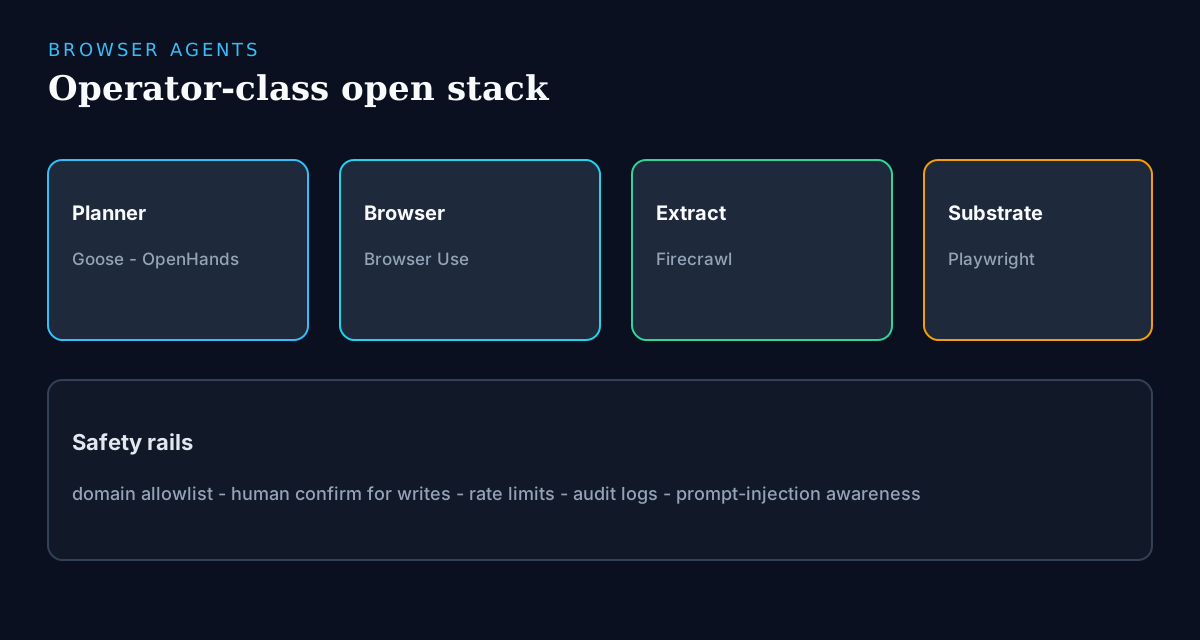
- Planner: Goose, OpenHands, or your chat agent with tools.
- Browser control: Browser Use and/or Playwright.
- Extraction: Firecrawl for pages you mainly need as text/markdown.
- Memory: vector store / notes—not infinite browser history in the prompt.
- Safety: domain allowlist, write-action confirmation, rate limits, audit logs.
Build playbook (first project)
The fastest honest path from viral demo to working stack:
- Day 1: define one recurring web task (weekly research digest, competitor page monitoring) and check whether a crawl alone solves it—Firecrawl first.
- Day 2: if interaction is required, prototype with Browser Use on a domain allowlist of exactly the sites involved, read-only.
- Day 3: harden the known steps into Playwright scripts; keep the agent only for parts that genuinely vary.
- Day 4: add rails—rate limits, action logging, and human confirmation for anything that submits or purchases.
- Day 5: schedule it, watch the logs for a week, and only then consider a second task or exposing it via MCP to your other agents.
Safety & compliance (non-negotiable)
- Obey robots.txt, site terms, and local law—AI does not grant permission.
- Never let an agent enter credentials into random sites without human approval.
- Sandbox browsers; assume prompt injection from page content.
- Prefer read-only research modes before any purchase/submit actions.
- Log every tool call when running unattended.
What still favors hosted Operator products
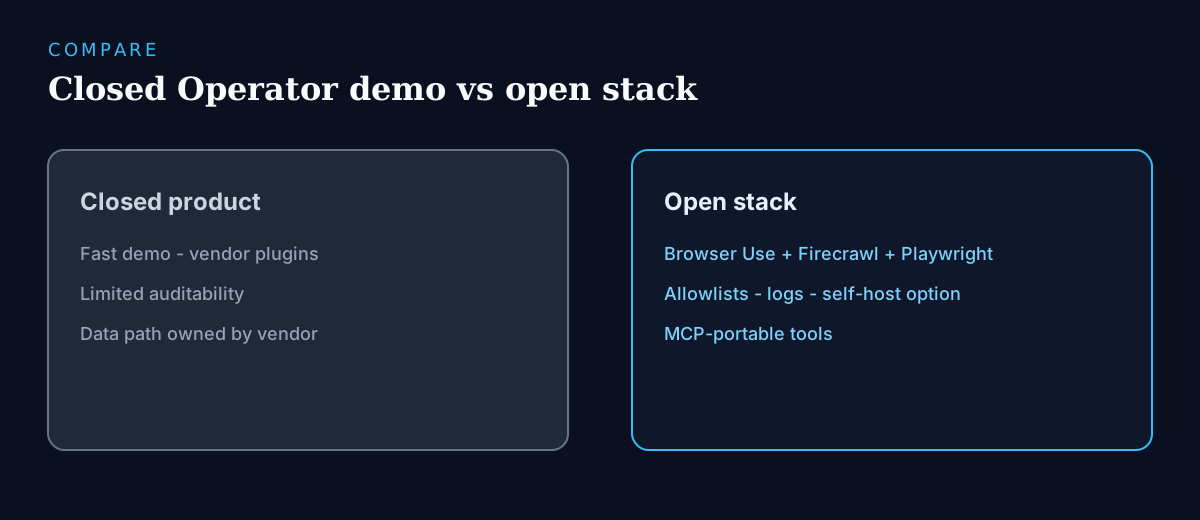
Hosted Operator-class products bundle managed browser infrastructure, anti-bot handling, and a polished approval UX that open stacks make you assemble. If you need occasional public-web research and cannot operate browsers at scale, hosted may be the pragmatic choice. The open stack wins when pages or credentials are sensitive, when volume makes per-task pricing painful, or when you need the audit trail and rate-limiting to be under your control rather than a vendor's.
Frequently asked questions
- What is the best open-source ChatGPT Operator alternative?
- Browser Use is the closest viral match for LLM-driven browsing, and it is where most Operator-intent searches should start. Mature teams combine it with Playwright for the deterministic steps and Firecrawl for extraction rather than expecting one clone—the stack outperforms any single project.
- Is Firecrawl a browser agent?
- Firecrawl is primarily crawl/extract for LLM pipelines—it reads sites rather than interacting with them. It often sits beside browser agents in the same stack: crawl for the content-heavy work, agent for the genuinely interactive steps. Using an agent where a crawl suffices wastes tokens and adds risk.
- Can browser agents replace Perplexity?
- For some research workflows yes, with more ops burden. Perplexity-class products optimize the answer-plus-citations UX; open stacks optimize control, private data paths, and custom pipelines. If your research touches internal or sensitive sources, the open stack is often the only viable option.
- How does MCP relate to browser agents?
- Expose browser/crawl tools as MCP servers so the same capabilities work inside coding agents and chat clients—not only one Operator UI. Browser tools have the highest blast radius of any MCP server, so add them last, behind allowlists, per the safety ladder in our MCP guide.
- Should I self-host browser agents?
- Yes when pages or credentials are sensitive, when volume is high, or when you need full audit logs. No when you only need occasional public research and cannot operate browsers safely at scale—a hosted product or a plain crawl job is the safer answer there.
- What does an open browser-agent stack cost?
- The libraries are free; the costs are model tokens (agents make many calls per page), browser infrastructure (headless instances, proxies if applicable), and ops time. Crawl-first designs cut costs dramatically—measure tokens per completed task in your pilot before scaling.
Conclusion
Browser agents are the viral cousin of MCP plugins: tools that make AI act in the world, with all the leverage and risk that implies. Start from the Operator alternatives hub, but resist the clone hunt—shortlist Browser Use for agentic control, Firecrawl for extraction, and Playwright for the deterministic backbone, then compose them around one recurring task. Follow the playbook: crawl first, agent only where interaction is real, rails before anything unattended. The teams that get durable value are the ones whose stack survives an audit and a site redesign—not the ones with the flashiest demo video.
Build a stack for this use case.
Answer nine practical questions and compare three transparent architectures with costs, free limits, lock-in, and migration paths.
Build my stack