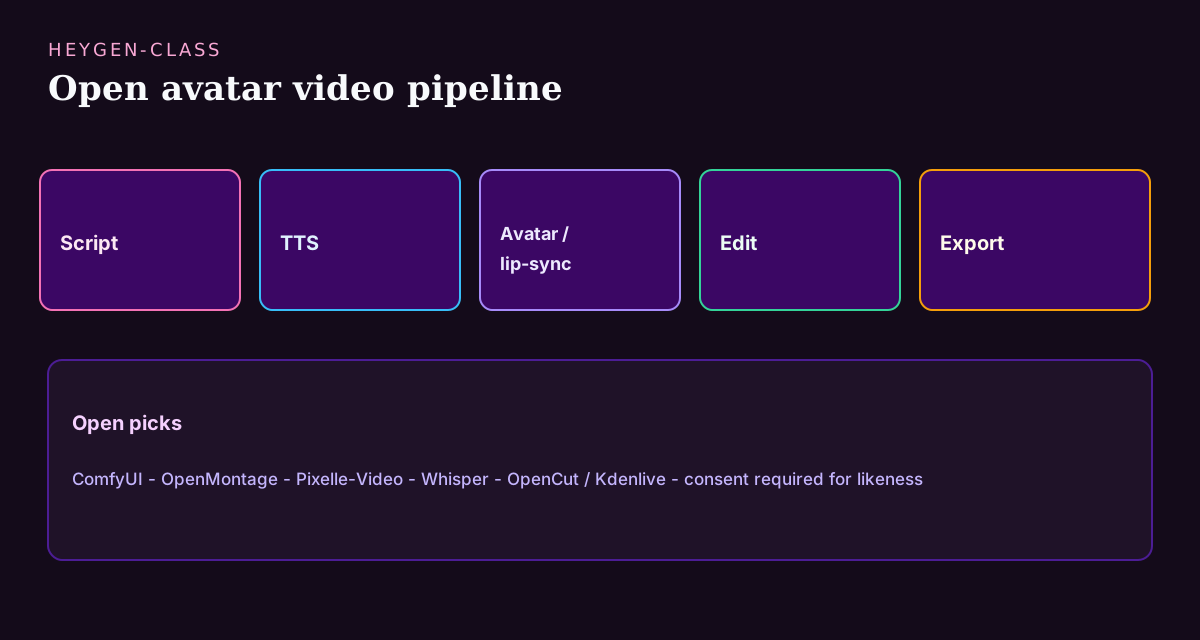
HeyGen made AI avatars mainstream: script in, presenter video out, with translation and lip-sync handled invisibly. The product wins because it hides an entire media pipeline—voice synthesis, avatar animation, lip-sync, editing, export—behind one upload button. Open-source alternatives are rarely one button; they are pipelines: voice (TTS), lip-sync/avatar generation, and editing. That is why ComfyUI graphs, OpenMontage and Pixelle-Video experiments, Whisper transcription, and OpenCut/Kdenlive finishing keep showing up in “HeyGen alternative” searches.
Teams go open for predictable reasons: per-minute or per-credit pricing that punishes volume, footage and likenesses that cannot be uploaded to a third party, brand or legal review that demands knowing exactly which models touched the content, and the need to batch-generate hundreds of localized clips without a per-video invoice. Each of those maps to a different stage of the open pipeline rather than a single product swap.
Set expectations honestly: hosted HeyGen optimizes polish and speed; open stacks optimize control, cost at scale, and private footage—with more GPU operations and fewer instant templates. The realistic goal is not cloning HeyGen’s UX but replacing the stages you care about, proving one clip end-to-end, and industrializing from there.
Key takeaways
- ComfyUI is the flexible generative studio for avatar/video experiments.
- OpenMontage and Pixelle-Video target video assembly/generation workflows.
- Pair Whisper (STT) + open TTS when you need script↔audio loops.
- Finish in OpenCut/Kdenlive/Shotcut—generation ≠ editing.
- Respect likeness/consent laws; open weights do not equal permission to clone people.
- Budget GPU time and review time—open pipelines trade invoices for operations.
Clarify what “HeyGen alternative” usually means
The search hides several distinct jobs, and the right open stack differs for each:
- Talking-head / avatar videos from a script—the classic presenter clip.
- Localization: same avatar and message, new language audio and lip-sync.
- Training and marketing clips without booking a studio day.
- Private on-prem generation for sensitive brands, footage, or people.
- Batch production at a scale where per-minute SaaS pricing stops making sense.
Quick comparison
| Project | Pipeline role | Best for | Notes |
|---|---|---|---|
| ComfyUI | Generative graph studio | Custom avatar/video graphs | Steep learning curve but the most powerful open lab; huge node ecosystem |
| OpenMontage | Video montage/AI video | Assembly-oriented workflows | Verify current docs and hardware needs before committing a pipeline to it |
| Pixelle-Video | AI video tooling | Experimentation | Research/ops trade-offs; treat as a mid-pipeline stage, not a product |
| OpenCut | Open editor | Finishing + cuts | CapCut-class editing for the last mile—captions, cuts, exports |
| Kdenlive / Shotcut | Editors | Stable finishing | Mature NLE options when you need reliability over novelty |
| Whisper | Speech-to-text | Scripts from audio | Pairs with voice stacks; the transcription half of localization |
| Voicebox / VoxCPM | Voice-related OSS | TTS/voice experiments | License and quality vary—benchmark on your languages first |
How we evaluated
We reviewed official repositories, documentation, release activity, deployment requirements, and code or model licenses. The shortlist is organized by the pipeline job each project can actually replace: generation graph, avatar or lip-sync stage, speech layer, editor, or export. We also weighted consent controls, data location, repeatability, and the work required to operate the stack. Catalog-wide context is documented in our 2026 open-source ecosystem report.
We did not run an independent avatar-quality or lip-sync benchmark for this update. Vendor demos and project showcases are useful capability evidence, but they are not neutral quality measurements. Test the exact languages, faces, resolution, GPU, and consent workflow you intend to use.
ComfyUI
ComfyUI
Open in catalogNode-based generative studio—the practical open “lab” for image, video, and avatar pipelines when HeyGen’s templates are not enough, or when footage cannot leave your GPU box. Strengths: a graph you can inspect, version, and rerun; an enormous ecosystem of community nodes for lip-sync, video, and audio stages; and complete control over which models run. Limits: a real learning curve, GPU requirements that grow with ambition, and no built-in brand-safety rails—you build the workflow. Choose it when you need custom pipelines or on-prem generation and can invest setup time.
- Best for
- Creators and ML-curious teams building custom media graphs.
- Deployment
- Local / self-managed.
- Pricing
- Open-source UI; models have separate licenses.
- Unique
- Best flexible studio in HeyGen-adjacent open stacks.
OpenMontage + Pixelle-Video
OpenMontage
Open in catalogOpen video/montage-oriented project useful when HeyGen searches are really about assembling AI video—not only a SaaS avatar storefront. Strengths: an assembly-first mental model that matches how localized and templated clips are actually produced. Limits: a younger project than the established editors—verify docs, hardware needs, and maintenance activity before building a production pipeline on it. Choose it as the assembly stage between generation (ComfyUI) and finishing (OpenCut/Kdenlive), not as a HeyGen twin.
- Best for
- Builders experimenting with open video pipelines.
- Deployment
- Self-managed.
- Pricing
- Open-source; verify hardware needs.
- Unique
- Strong catalog peer for generative video assembly.
Pixelle-Video
Open in catalogAI video tooling in the open catalog. Strengths: a place to experiment with generative video beyond template libraries, with full visibility into what runs. Limits: quality varies by model and setup, and it is research-flavored—expect iteration, not turnkey output. Choose it as an experimental stage in a HeyGen-class pipeline when you want to push past templates, then always finish in a real editor before anything ships.
- Best for
- Teams exploring open generative video beyond templates.
- Deployment
- Self-managed.
- Pricing
- Open-source; quality varies by model/setup.
- Unique
- Useful mid-pipeline project next to ComfyUI.
Editing + speech layers
OpenCut
Open in catalogOpen editor for cutting, timelines, and export. HeyGen generates; editors ship—captions, brand kits, pacing, and platform-specific exports all live in this stage. Strengths: a CapCut-class workflow without the account walls, good for the social-clip last mile. Limits: it is an editor, not a generator—pair it with the generation stages above instead of forcing one tool to do everything. Choose it (or Kdenlive/Shotcut for heavier timelines) as the mandatory finishing step after avatar generation.
- Best for
- Creators finishing AI clips for social/web.
- Deployment
- Desktop / self-managed.
- Pricing
- Open-source.
- Unique
- Best CapCut-class finishing step after avatar generation.
Whisper
Open in catalogOpen speech-to-text foundation. Strengths: robust multilingual transcription that recovers scripts from existing videos, powers subtitle and localization pipelines, and feeds TTS stages in an avatar workflow. Limits: it is one direction only—speech in, text out—so it needs a TTS partner for the full loop, and larger models want a GPU. Choose it whenever your HeyGen-class workflow includes existing footage, localization, or captions; it is usually the first stage worth automating.
- Best for
- Teams that need transcripts in the HeyGen-class loop.
- Deployment
- Local / GPU-friendly depending on model size.
- Pricing
- Open model/code; hardware costs separate.
- Unique
- Essential STT building block beside ElevenLabs/HeyGen stacks.
Selection criteria
Judge open video stacks on the constraints that decide whether clips actually ship every week:
- Can the whole pipeline run on hardware you control, with no footage uploaded anywhere?
- What GPU does one minute of finished video actually require—measured, not estimated?
- Are model licenses compatible with commercial video for your use case?
- How much human review time does each clip need before it is brand-safe?
- Can the pipeline be re-run deterministically for localization batches?
- Is consent documented for every real voice and likeness in the workflow?
Migration playbook
Do not cancel the HeyGen subscription first. Prove the open pipeline on one real clip:
- Day 1: pick one existing 30-second HeyGen clip as the benchmark; write down its script, voice, and brand requirements.
- Days 2–3: build the generation stage—ComfyUI graph (or OpenMontage/Pixelle-Video experiment) plus an open TTS voice; iterate until the raw output is watchable.
- Day 4: finish the clip in OpenCut or Kdenlive—captions, brand kit, export presets—and compare it side-by-side with the HeyGen original.
- Day 5: total the real costs (GPU hours, setup time, review time) against the HeyGen invoice for the same output; decide which pipeline stages are worth owning.
- Then industrialize only the winning stages: many teams keep hosted generation for rush jobs and use the open pipeline for volume and sensitive content.
What still favors paid HeyGen
Hosted HeyGen keeps real advantages: photoreal avatar quality tuned by a dedicated team, one-click translation with lip-sync that just works, template libraries that make non-editors productive, and zero infrastructure. If your volume is low and your content is not sensitive, the subscription is often the rational choice. The open pipeline wins on privacy (footage never leaves your hardware), cost at real volume, auditability for legal review, and customization that templates cannot express.
Ethics & brand safety
- Get consent before cloning a real person’s likeness or voice.
- Label synthetic media when required by platform or law.
- Keep brand kits (fonts, colors, disclaimers) in the editor stage.
- Store prompts/models used for auditability on paid campaigns.
Frequently asked questions
- What is the best open-source HeyGen alternative?
- There is no perfect twin. ComfyUI-centered pipelines plus open editors are the practical answer for most teams; OpenMontage and Pixelle-Video help on the video assembly side. Think in stages—voice, generation, finishing—and replace the stages where control or cost matters most, rather than hunting for one product.
- Can open source match HeyGen quality?
- For constrained clips—fixed avatar, controlled lighting, short scripts—increasingly yes. For arbitrary photoreal presenters with one-click translation, hosted HeyGen still leads on polish and speed. Measure on your own GPU and count human review time, because that is where open pipelines win or lose in practice.
- HeyGen vs Runway vs CapCut?
- HeyGen skews avatars and presenters; Runway skews generative video effects; CapCut skews editing and templates. They are different pipeline stages, not competitors. Open stacks typically combine a generation stage (ComfyUI-class) with an NLE finishing stage (OpenCut/Kdenlive)—the same split the SaaS products hide.
- Do I also need an ElevenLabs alternative?
- If voice quality is the bottleneck, yes—the voice stage usually determines whether an avatar clip feels professional. See the ElevenLabs open guide, benchmark open TTS on your languages, and pair the winner with your avatar pipeline before judging overall quality.
- What hardware do I need for an open HeyGen-class pipeline?
- A modern consumer GPU (12–24 GB VRAM) covers most avatar and lip-sync experiments; batch localization at volume benefits from more. Start by measuring one clip end-to-end—GPU minutes per finished minute of video is the number that decides whether self-hosting beats the invoice.
Conclusion
Replace HeyGen as a pipeline, not a product: generate with ComfyUI-class tools, voice with open TTS, finish in OpenCut or Kdenlive, and keep consent non-negotiable at every stage. The teams that succeed pick one real 30-second clip, rebuild it end-to-end, and compare true costs—GPU, setup, and review time—against the invoice before deciding what to own. Most land on a hybrid: hosted for rush jobs, open pipeline for volume and private footage. Start from the HeyGen hub, prove the clip, then industrialize only the stages that earned it.
Build a stack for this use case.
Answer nine practical questions and compare three transparent architectures with costs, free limits, lock-in, and migration paths.
Build my stack