Postman popularized collaborative API workspaces, but many teams now want lighter clients, offline-first collections, or tools they can self-host. Pricing changes, forced cloud sync, and workspace sprawl pushed a lot of engineering orgs to reconsider what they actually use Postman for. The best alternative depends on whether you need design docs, automated tests, or simple request debugging—not which UI looks most like Postman.
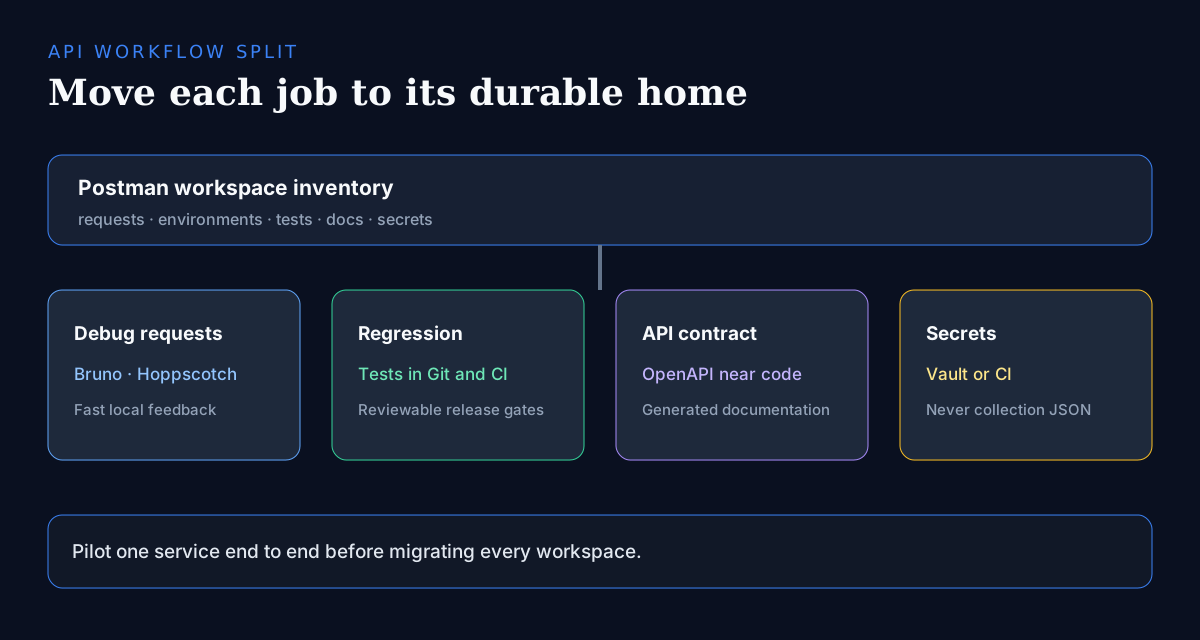
The usual failure mode is treating the migration as a UI swap: exporting every workspace into a new GUI and recreating the same sprawl somewhere else. In practice, most Postman workspaces hide three different jobs—exploratory debugging, release-gate regression suites, and shared documentation—and each job has a different best home. Debugging fits a lightweight client, regression belongs in code and CI, and documentation belongs next to an OpenAPI spec.
Before you migrate anything, inventory how collections are stored today (cloud workspaces vs exportable JSON), where secrets live (environment variables, vaults, or—worse—committed exports), and which requests actually protect a release. Shortlist two tools against those constraints, then migrate one real service end-to-end before touching the rest.
Key takeaways
- Bruno or plain .http files win when API collections must live in Git and review like code.
- Hoppscotch fits browser-first teams that want a FOSS client with self-hosting options.
- Insomnia remains a strong desktop client when GraphQL and plugins matter more than Git-native storage.
- If Postman is mainly a regression suite, move tests into code (Karate, REST Assured, or HTTP clients in CI).
- Keep secrets in a vault or CI—never in exported collection JSON.
- Hybrid setups are normal: engineering on Git-native tools while partners keep a Postman workspace during transition.
Clarify what “Postman alternative” means
- Exploratory request debugging: a fast client for one-off authenticated calls.
- Shared collections: a team library of requests that must stay in sync.
- Automated regression: suites that gate releases and run headless in CI.
- API design and documentation: specs, mocks, and published reference docs.
- Scripting and chaining: pre-request logic, token refresh, and data-driven runs.
- Partner-facing workspaces: collections shared with customers or external teams.
Selection criteria
- Collection format and Git-friendliness (YAML/JSON in-repo vs cloud-only workspaces).
- Auth helpers: OAuth, API keys, mTLS, environment secrets.
- Automation: CLI runners, CI plugins, and scripting depth.
- Team features: sync, roles, mock servers, and documentation publishing.
- Deployment preference: desktop-only, SaaS, or self-hosted.
- Language ecosystem fit—especially if your APIs are Node, Go, or Python services.
- Exit cost: how hard is it to leave the next tool if it changes pricing or licensing?
Quick comparison
| Tool | Best for | Deployment | Notes |
|---|---|---|---|
| Bruno | Collections-as-code | Desktop / local-first | Filesystem-native collections; Git diffs and PR review; no forced cloud |
| Hoppscotch | Browser + self-host | Web SaaS / self-hosted | Postman-lite UX; FOSS; self-host removes cloud lock-in |
| Insomnia | Desktop GraphQL/REST | Desktop; optional sync | Clean UI, plugins, strong GraphQL; sync is cloud-based |
| HTTPie | CLI + quick calls | CLI / desktop | Readable syntax in scripts and onboarding docs; not a team workspace |
| IDE HTTP clients | Code-adjacent requests | Local IDE | Requests live beside application code; free with the IDE |
| .http files | Zero-SaaS smoke tests | Repo + editor/CI | Maximum portability and reviewability; no GUI collection features |
| Karate / REST Assured | Regression at scale | Code-first CI | Assertions, fixtures, and reports as code; needs engineering ownership |
| OpenAPI suites | Design governance | SaaS / local mix | Spec as source of truth for mocks, docs, and linting |
| Apidog | Design + test suite | Desktop / SaaS | Commercial all-in-one; closest feature-for-feature Postman rival |
| curl + scripts | CI / minimal envs | Anywhere a shell runs | Zero lock-in; pair with Make/Just for team conventions |
Insomnia
Insomnia
A polished API client with collections, environments, and a plugin ecosystem. It is strong for GraphQL and REST debugging with a cleaner UI than heavyweight suites, and useful when designers and backend engineers share the same request library. Limits: collection storage is not Git-native, and team sync goes through the vendor cloud—teams that left Postman over lock-in should weigh that trade-off. Choose it when desktop ergonomics and GraphQL depth matter more than collections-as-code.
- Best for
- Developers who want a fast desktop client with optional cloud sync.
- Deployment
- Desktop app; cloud sync optional.
- Pricing
- Free core usage with paid collaboration tiers.
- Unique
- Clean UX and strong GraphQL support.
Hoppscotch
Hoppscotch
Open in catalogAn open-source web API client that feels like a modern Postman lite, with self-hosting options for teams that want browser-based workflows without vendor lock-in. Strengths: instant onboarding (open a URL, send a request), REST/GraphQL/WebSocket support, and a self-hosted deployment that keeps traffic inside your network. Limits: browser sandboxing constrains some advanced auth and local-network flows, and the automation story is thinner than code-first frameworks. Choose it when the team is browser-first and FOSS hosting is a requirement.
- Best for
- Teams that prefer a lightweight web UI and FOSS hosting.
- Deployment
- Web SaaS and self-hosted.
- Pricing
- Open-source; hosted plans available.
- Unique
- Browser-first speed with self-host control.
Bruno
Bruno
An offline-first API client that stores collections as plain text files in your repo, making Git review and diffs natural. Strengths: no forced cloud account, collections version alongside the code they test, and a CLI runner for CI. Limits: team features like shared cloud workspaces and hosted mocks are intentionally absent or newer, so partner-facing collections may still need another home. Choose it when 'collections must review like code' is your top requirement—it is the strongest Git-native default in this list.
- Best for
- Engineering teams that treat API collections as code.
- Deployment
- Desktop / local-first.
- Pricing
- Open-source with optional paid features depending on edition.
- Unique
- Filesystem-native collections instead of proprietary cloud blobs.
HTTPie
HTTPie
A human-friendly HTTP client with a beloved CLI and a desktop app for exploratory requests. Strengths: syntax that stays readable in scripts and onboarding docs, sessions for authenticated flows, and JSON-first defaults that cut boilerplate. Limits: it is a request tool, not a collection manager—there is no team workspace or regression-suite story on its own. Choose it as the daily terminal driver next to whichever collection tool your team standardizes on.
- Best for
- Developers who live in the terminal or need quick authenticated calls.
- Deployment
- CLI and desktop.
- Pricing
- Free/open tools with commercial cloud options for teams.
- Unique
- Ergonomic CLI syntax that remains readable in scripts.
IDE-native clients
IDE-native clients
VS Code and JetBrains HTTP clients keep requests next to application code, which reduces context switching for backend work and makes reviews obvious in diffs. Strengths: zero extra install for most teams, environment variables per project, and requests that travel with the repo. Limits: no shared team workspace, weaker auth helpers than dedicated clients, and features vary between IDEs in mixed-editor teams. Choose them when backend engineers are the only audience and the IDE is already home.
- Best for
- Backend engineers who already work primarily in an IDE.
- Deployment
- Local IDE extensions.
- Pricing
- Usually free with the IDE; some cloud sync extras are paid.
- Unique
- Requests live beside the codebase you are changing.
.http / .rest files
.http / .rest files
Plain-text request files committed to the repo and run from editors or CI. Strengths: maximum portability, trivial code review, and zero SaaS dependency—especially valuable for smoke tests in polyglot monorepos. Limits: no GUI collection management, scripting is minimal, and complex auth flows need external tooling. Choose them as the lowest-cost baseline: even teams standardized on a GUI client benefit from a handful of .http smoke tests living beside each service.
- Best for
- Teams that want zero SaaS dependency for smoke tests.
- Deployment
- Local files + editor runners.
- Pricing
- Free.
- Unique
- Maximum portability and code review friendliness.
Karate / REST Assured
API test frameworks
When Postman is mainly used for regression suites, dedicated test frameworks like Karate and REST Assured scale better than GUI collections: assertions, fixtures, and reporting become first-class code with real version control and code review. Strengths: data-driven tests, contract testing, and pipeline-native reports that GUI runners approximate at best. Limits: they require engineering ownership—non-developers cannot maintain suites, and there is no exploratory UI. Choose them once a collection starts gating releases; that is test infrastructure, not a scratchpad.
- Best for
- QA and platform teams automating contract and integration tests.
- Deployment
- Code-first in CI.
- Pricing
- Open-source cores.
- Unique
- Proper assertions, data fixtures, and pipeline-native reporting.
OpenAPI-centric tools
OpenAPI-centric tools
Design-first platforms that treat the OpenAPI document as the source of truth for mocks, docs, and linting. Strengths: one spec drives generated clients, contract validation, and published reference docs, which eliminates drift between what Postman collections say and what the API does. Limits: they assume your org actually maintains specs—retrofitting OpenAPI onto undocumented services is its own project. Choose them when the real Postman pain is governance and documentation, not request debugging.
- Best for
- API platform teams standardizing on OpenAPI governance.
- Deployment
- SaaS and local tooling mixes.
- Pricing
- Freemium to enterprise.
- Unique
- Spec-driven consistency across docs, mocks, and clients.
Apidog
Apidog
An all-in-one API design, debug, mock, and test product positioned as a Postman-class suite with competitive pricing for product teams that want design and test together. Strengths: the closest feature-for-feature Postman replacement in this list, with spec-driven mocks and a unified workflow. Limits: it is a commercial product, so you trade one vendor dependency for another—evaluate export paths and pricing tiers before committing. Choose it when the team genuinely needs the full suite and FOSS alternatives feel too assembled-from-parts.
- Best for
- Product teams wanting design + test in one commercial tool.
- Deployment
- Desktop/SaaS.
- Pricing
- Freemium commercial pricing.
- Unique
- Broader design/mock workflow than a pure request client.
curl and scripts
curl and scripts
Still the universal fallback: portable, scriptable, and available everywhere a shell runs. Strengths: zero lock-in, zero install in most environments, and perfect fit for infrastructure-as-code cultures—pair with Make, Just, or npm scripts for team conventions. Limits: raw curl gets unreadable fast for complex auth and chained requests, and there is no collection or discovery story. Choose it for CI smoke checks and minimal environments, not as the primary interface for a large API surface.
- Best for
- Automation, CI smoke checks, and minimal environments.
- Deployment
- Anywhere a shell runs.
- Pricing
- Free.
- Unique
- Zero lock-in and perfect for infrastructure-as-code cultures.
Migration playbook
- Audit workspaces first: tag every collection as debugging scratchpad, release gate, or documentation—each class migrates differently.
- Export Postman collections and convert one critical environment first, not the whole account.
- Move secrets to your vault/CI—not into committed JSON; audit exported files before the first commit.
- Rebuild only the requests that still protect a release gate; archive dead collections instead of porting them.
- Run dual tooling for one sprint: the migration is done when CI passes on the new runner, not when the export finishes.
- Keep Postman temporarily for stakeholders and partners while engineering moves to Git-friendly tools.
- Write a short team convention doc: where collections live, how environments are named, and which tool is authoritative.
What still favors a Postman seat
- Partner-facing public workspaces and run-in-Postman documentation buttons.
- Non-engineering stakeholders (support, QA, product) who rely on the GUI and shared cloud workspaces.
- Heavy use of Postman-specific features: monitors, mock servers, and governance built on Postman's cloud.
- Existing paid contracts where migration cost exceeds the remaining subscription value—plan the exit at renewal instead.
Frequently asked questions
- What is the best open-source Postman alternative in 2026?
- There is no single winner. Bruno is the best default when collections must live in Git and review like code; Hoppscotch is the best browser-first and self-hosted option; Insomnia fits desktop GraphQL/REST work with plugins. If Postman is mainly regression testing, prefer code-first frameworks like Karate or REST Assured instead of another GUI—suites that gate releases belong in CI, not in a click-through runner.
- Can I keep using Postman for some teams?
- Yes, and most successful migrations do. Hybrid setups are normal: engineering moves to Git-native tools while product, support, or external partners stay on Postman until their collaboration needs change. The key is documenting which collections are authoritative so the two worlds do not drift—usually the Git-side copy wins for anything CI depends on.
- How do I migrate Postman collections safely?
- Export one critical environment first, strip every secret into a vault or CI variables before anything touches Git, and convert only the requests that protect a release gate. Run the old and new tooling in parallel for a sprint, and declare the migration done when CI passes on the new runner—not when the export completes. Archive stale collections instead of porting them.
- When should I abandon GUI clients entirely?
- When most of the value is automated regression, contract tests, or smoke checks in CI—those belong in code-first frameworks with real assertions and reports. GUI clients still earn their place for exploratory debugging and onboarding, so most teams keep a lightweight client (Bruno, Hoppscotch, HTTPie) alongside code-first suites rather than going CLI-only.
- Is Bruno mature enough to replace Postman for a whole team?
- For engineering teams whose main requirement is Git-native collections, yes—the file-based format and CLI runner cover the core workflow. Gaps remain around hosted mocks, partner-facing workspaces, and non-developer collaboration, so check those against your inventory. Teams that need the full cloud suite should compare Hoppscotch self-hosted or a commercial option like Apidog.
Conclusion
The teams that migrate well never look for a Postman clone—they split the job. If your pain is cloud lock-in, start with Bruno or Hoppscotch and put collections under code review. If your pain is regression testing at scale, move suites into Karate, REST Assured, or plain HTTP clients in CI, where failures block merges instead of relying on someone clicking Run. Keep a lightweight client for exploratory debugging, keep secrets in a vault, and keep Postman only where its collaboration model still pays for itself—usually partner-facing workspaces. Migrate one real service end-to-end first; the inventory you build doing that will make every following service cheaper.
Build a stack for this use case.
Answer nine practical questions and compare three transparent architectures with costs, free limits, lock-in, and migration paths.
Build my stack