Photoshop remains the industry reference for raster editing, compositing, and production handoff. Most creators, though, only need a slice of that surface: retouch a photo, paint an illustration, ship an SVG logo, or open a PSD once for a contractor. Free and open-source tools cover those jobs well—if you match the tool to the workflow instead of hunting for a one-to-one clone.
The usual failure mode is expecting a single FOSS app to recreate every Photoshop panel, filter, and Cloud Document habit. Treat the switch as assembling a small toolkit: a raster editor for photos and composites, a painting app for illustration, a vector editor for logos and icons, and optionally a collaborative UI tool when “Photoshop alternative” really means design-system work.
Before you uninstall anything, list the files you must open this month (PSD, AI, RAW, SVG), the outputs clients expect (TIFF, PDF/X, PNG with transparency), and whether work must stay offline. Those three constraints eliminate most wrong shortlists in an afternoon.
Key takeaways
- GIMP or Photopea cover most photo retouching and PSD-adjacent raster work.
- Krita is usually the better daily driver for illustration, concept art, and comics.
- Inkscape owns logos, icons, and SVG/PDF vector deliverables—pair it with a raster tool.
- Penpot replaces Figma-like UI collaboration more than Photoshop itself.
- darktable and digiKam win for RAW libraries and non-destructive develop—not poster compositing.
- Hybrid stacks are normal: keep a paid seat only for the few files that still require it.
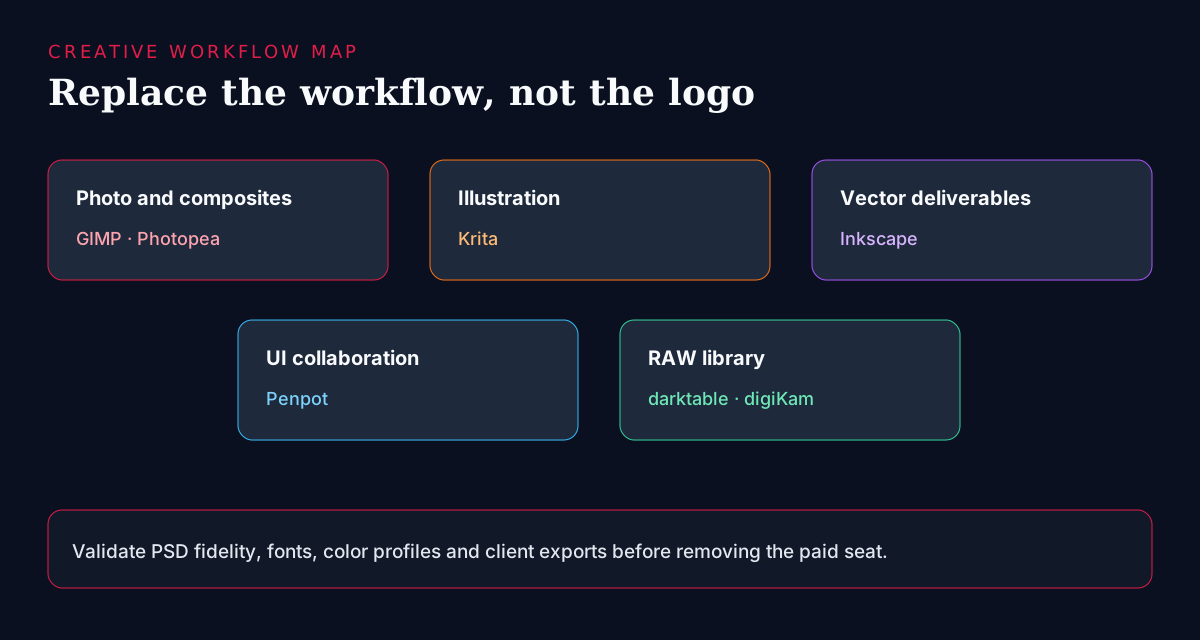
Clarify what “Photoshop alternative” means
- Photo retouching, masking, and layered compositing (raster).
- Digital painting, brushes, and frame-by-frame illustration.
- Logos, icons, and print vectors (SVG/PDF)—often mistaken for “Photoshop work.”
- Quick PSD edits without installing desktop software.
- Collaborative UI / design-system files (closer to Figma than Photoshop).
- RAW library management and non-destructive develop for photographers.
Selection criteria
- File fidelity: which PSD layers, smart objects, fonts, and effects survive a round-trip?
- Color management: ICC profiles, soft-proofing, and export presets for print or web.
- Offline ownership: must files stay on disk, or is a browser editor acceptable?
- Learning budget: can the team spend a week on a new UI, or do they need Photoshop muscle memory?
- Collaboration: single-artist desktop vs shared design files and comments.
- License and cost: truly FOSS vs freemium with ads/limits (Photopea) vs self-hosted ops (Penpot).
Match the tool to the workflow
- Photo retouching and compositing → GIMP (offline) or Photopea (browser / PSD familiarity).
- Digital painting and illustration → Krita as the default daily driver.
- Logo and layout vectors → Inkscape; use Penpot when the deliverable is UI collaboration.
- Quick edits without installing software → Photopea first, then revisit desktop for heavy files.
- Large RAW libraries → darktable and/or digiKam; finish hero composites in GIMP if needed.
- Still blocked after a real-file pilot → keep a paid seat for that job class only.
Quick comparison
| Tool | Best for | Deployment | Notes |
|---|---|---|---|
| GIMP | Raster editing & compositing | Desktop | Mature plugins; steeper UI; strong local ownership |
| Krita | Painting / illustration | Desktop | Brush engines, animation timelines, artist defaults |
| Photopea | Quick PSD edits | Web | High PSD familiarity; freemium; great for contractors |
| Inkscape | Vectors / logos / SVG | Desktop | SVG-native; pair with a raster editor |
| Penpot | UI design collaboration | SaaS / self-hosted | Closer to Figma than Photoshop |
| darktable / digiKam | RAW photography libraries | Desktop | Catalog + non-destructive develop |
GIMP
 GIMP
GIMP
The most established open-source raster editor for photo editing, masking, layers, and plugin-driven workflows. It can replace a large share of Photoshop’s day-to-day retouching and compositing once you accept a different UI model. Expect a short learning period for common actions (layers, masks, paths, export). Strengths: local file ownership, mature plugins, and no subscription. Limits: some advanced Photoshop effects, 3D, and generative features have no 1:1 twin—pilot with real client PSDs before mandating a full switch.
- Best for
- Photographers, marketers, and generalists who need offline raster editing and can invest a short learning period.
- Deployment
- Desktop (Windows, macOS, Linux).
- Pricing
- Free and open-source.
- Unique
- Mature plugin ecosystem and full local ownership of files.
Practical tip: write a one-page cheat-sheet for your team’s top ten actions (crop, heal, mask, text, export for web/print). Most “GIMP is hard” complaints are missing muscle memory, not missing capability.
Krita
 Krita
Krita
A painting-first application built around brush engines, pressure curves, layer modes that artists expect, and optional animation timelines. For illustration, concept art, and comics it is usually a better daily driver than GIMP, which remains a generalist raster tool. Strengths: brush quality, canvas performance for large paintings, and artist-oriented defaults. Limits: it is not the first pick for production photo retouching or PSD round-trips with agency clients—keep GIMP or Photopea in the toolkit for those jobs.
- Best for
- Illustrators, concept artists, comic creators, and anyone whose Photoshop use was mostly brushes and canvas work.
- Deployment
- Desktop.
- Pricing
- Free and open-source.
- Unique
- Brush quality and painting UX that often beats generalist editors.
Photopea
Photopea
A browser editor that opens many PSD files with surprising fidelity and keeps shortcuts and panels familiar to Photoshop users. It shines for quick contractor edits, Chromebooks, and “open this layered file once” situations where installing desktop software is friction. Strengths: PSD familiarity and zero install. Limits: freemium/ads, browser constraints on very large files, and weaker offline ownership—treat it as a bridge or satellite tool, not always as the long-term studio system of record.
- Best for
- Quick edits, PSD compatibility checks, freelancers, and Chromebook-friendly work.
- Deployment
- Web app.
- Pricing
- Free with ads; paid to remove limits.
- Unique
- High PSD fidelity without a local install.
Inkscape
 Inkscape
The leading open-source vector editor for logos, icons, illustrations, and SVG/PDF deliverables. Many “Photoshop alternative” searches are really vector problems: scaling marks, icon sets, or print paths that should never have lived as flat rasters. Strengths: SVG-native editing and solid export options. Limits: it is not a photo compositor—pair Inkscape with GIMP/Krita instead of forcing one app to own every asset type.
- Best for
- Brand designers, icon designers, and anyone producing SVG/PDF vector artwork.
- Deployment
- Desktop.
- Pricing
- Free and open-source.
- Unique
- SVG-native editing with solid export options.
Penpot
Penpot
Open in catalogOpen-source design and prototyping closer to Figma than Photoshop: components, shared libraries, and collaborative UI files you can self-host. Choose it when the real pain is product/design-system collaboration and proprietary cloud lock-in—not when you need healing brushes or RAW develop. Strengths: self-hostable design files and FOSS collaboration. Limits: it is not a raster editor replacement; keep GIMP/Krita for bitmap work.
- Best for
- Product and UX teams wanting self-hostable design files and design-system workflows.
- Deployment
- SaaS and self-hosted.
- Pricing
- Open-source core.
- Unique
- Design-system collaboration without proprietary cloud lock-in.
darktable and digiKam
darktable & digiKam
RAW-focused photography tools for cataloging, tagging, and non-destructive develop. They excel when the pain is a growing library and consistent develop presets—not poster design or multi-layer marketing composites. Strengths: photographic depth Photoshop does not prioritize. Limits: for heavy compositing and typography-heavy layouts, finish in GIMP (or keep a paid compositor) after develop.
- Best for
- Photographers managing large libraries and shoot-to-develop pipelines.
- Deployment
- Desktop.
- Pricing
- Free and open-source.
- Unique
- Photographic workflow depth Photoshop does not prioritize.
Migration playbook
- Inventory the last 20 shipped files: formats, color spaces, fonts, and who must open them.
- Export critical PSDs early; verify fonts, smart objects, and layer effects in the target tool.
- Pilot one real job end-to-end (brief → edit → export → client review) before a team mandate.
- Rebuild complex Actions as scripts, macros, or reusable templates in the new tool.
- Document ICC profiles and export presets so every project does not reinvent color.
- Keep a paid seat for the minority of deliverables that still fail FOSS pilots—hybrid is fine.
- Train with a shared cheat-sheet and two office-hours sessions; UI panic is the main churn cause.
What still favors a paid seat
- Agency handoff that mandates native PSD with specific plugins or Generative Fill workflows.
- Print pipelines that depend on proprietary soft-proofing or tightly controlled PDF/X presets.
- Heavy 3D, advanced video, or Adobe ecosystem features you already standardized on.
- Client contracts that explicitly require Adobe Creative Cloud deliverables.
Frequently asked questions
- Is there a free tool that fully replaces Photoshop?
- No single free app replaces the entire Photoshop feature surface. Free tools replace workflows: GIMP/Photopea for raster, Krita for painting, Inkscape for vectors, Penpot for UI collaboration, and darktable/digiKam for RAW libraries. Validate with your real client file types before a full switch.
- Which free Photoshop alternative is best for beginners?
- Photopea is often easiest for people who already know Photoshop shortcuts and need quick PSD edits in the browser. GIMP is the stronger long-term offline default once you invest a short learning period and write a team cheat-sheet.
- What should illustrators use instead of Photoshop?
- Krita. It is painting-first, with brush engines and canvas workflows that usually beat generalist raster editors for illustration, concept art, and comics. Keep a separate tool for photo retouching if you still do both jobs.
- When is Penpot the right “Photoshop alternative”?
- When the real need is collaborative UI or design-system work (Figma-like), not photo compositing. Penpot is not a raster editor replacement—pair it with GIMP or Krita for bitmap assets.
- Can I keep Photoshop for some projects?
- Yes. Hybrid stacks are normal and often smarter than a forced 100% migration. Keep a paid seat for the file types or client contracts that still fail your FOSS pilot, and document which tool is authoritative per deliverable.
Conclusion
No single free app replaces every Photoshop feature—and that is the wrong goal. Combine GIMP or Photopea for raster work, Krita for painting, Inkscape for vectors, and Penpot only when collaboration is the real product need. Pilot one real client file end-to-end, keep a paid seat where the pilot fails, and treat the switch as a documented toolkit instead of a leap of faith.
Build a stack for this use case.
Answer nine practical questions and compare three transparent architectures with costs, free limits, lock-in, and migration paths.
Build my stack